Email signature
À lire aussi

Adding an email signature to Gmail is a great way to personalize your emails and communicate important information like your contact details or your company logo.
.png)
Marketplace, Waalaxy integration, offline AI scanner, badge folders, multilingual app... WEMET is opening up to your ecosystem this month. Discover all the new features and our tips for getting the most out of them.
In 2026, email remains the most used professional communication channel, with an average of 121 emails sent and received per day and per employee. However, the email signature remains an under-exploited space by many organizations. Much more than a simple digital business card, a powerful email signature tool turns each email into a branding and conversion opportunity.

Email remains the dominant communication channel in business. An employee sends an average of 40 emails per day, or around 10,000 branding opportunities per year and per employee.
However, the email signature remains an underexploited space, despite the fact that it is a powerful lever for brand image and lead generation.
The use of professional email signature tools is no longer a matter of simple aesthetic comfort, but a real communication strategy. These solutions transform a simple message closure into a dynamic, standardized and measurable marketing channel.
Beyond visual harmonization, the challenge is technical and legal: guaranteeing the conformity of legal notices, ensuring the deliverability of messages and securing data. For technical directors (CIOs) and marketing managers, deploying a dedicated solution meets a double imperative: reducing the administrative burden associated with managing individual signatures while maximizing the return on investment (ROI) of each email sent.
The adoption of a solution dedicated to the management of electronic signatures meets specific needs for standardization, marketing performance and operational efficiency.
The uniformity of the visual identity is a fundamental pillar of the credibility of a company.
When an organization lets its employees manage their own signatures, it is exposed to blatant disparities: distorted logos, fonts that don't comply with the graphic charter, or worse, “Sent from my iPhone” mentions. One professional email signature tool guarantees that 100% of outgoing emails scrupulously respect the brand identity.
Technically, these tools ensure perfect HTML rendering on all email clients (Outlook, Gmail, Apple Mail) and on all media (desktop, mobile). This visual coherence reinforces the confidence of the interlocutors. The automatic integration of reinsurance elements, such as certifications (ISO, RSE), links to social networks or mandatory legal information, instantly professionalizes each exchange. A controlled signature projects an image of rigor and transforms each employee into a reliable ambassador for the company.
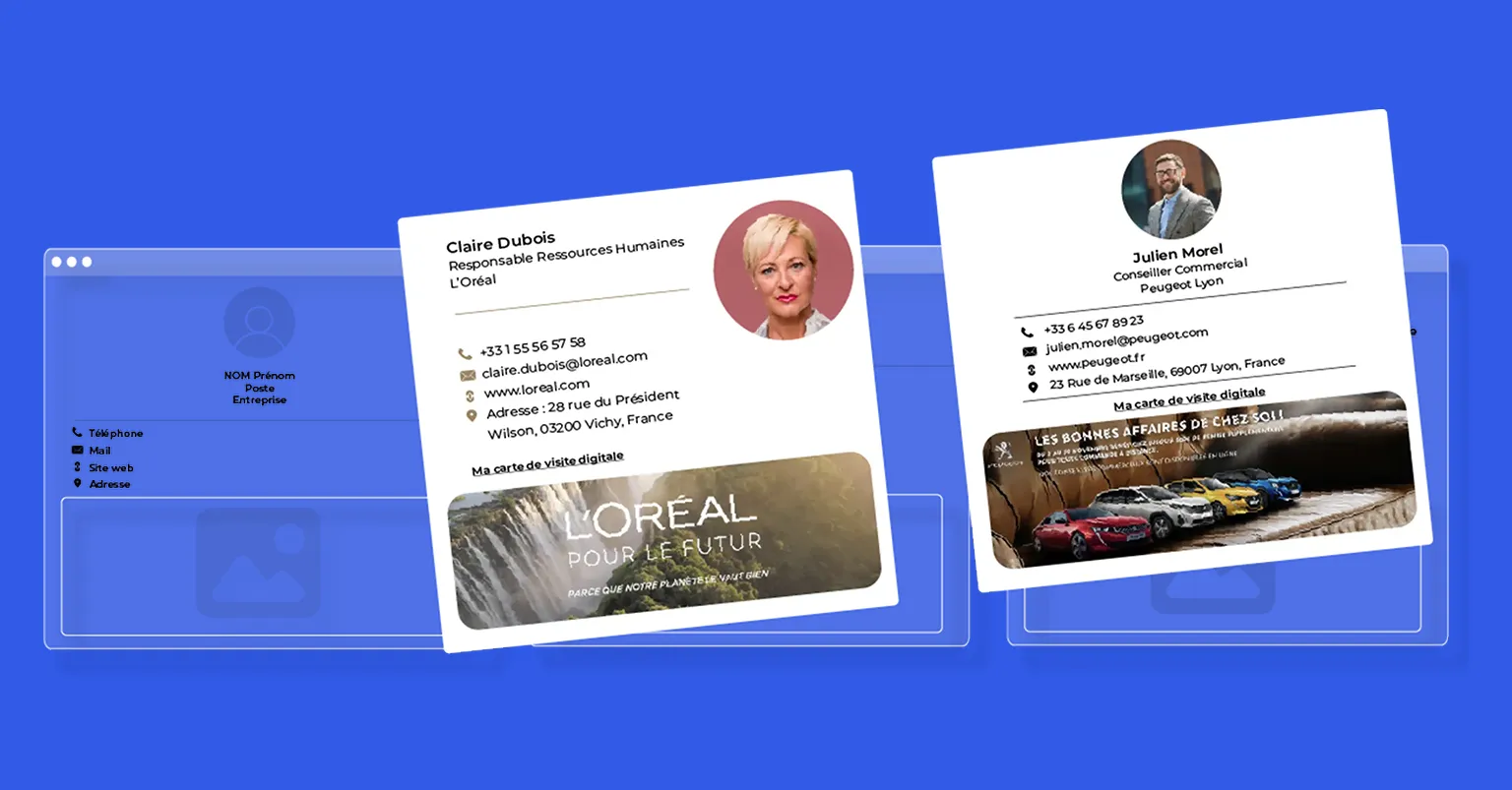
The email signature is an extremely powerful “owned media” advertising channel. Unlike mass email campaigns, which may suffer from low open rates, transactional emails benefit from an opening rate close to 100%. Using a management tool allows you to insert dynamic and clickable marketing banners under the collaborator's contact details.
The possibilities are vast: promoting a new white paper, inviting you to a webinar, announcing a presence at a trade show or putting forward a promotional offer. These campaigns can be segmented by department (a “Recruiting” banner for HR, a “New Product” banner for salespeople) and scheduled over time. Signature banners often generate higher click rates (CTR) than traditional display banners because they are part of a trusted conversation context. It's a non-intrusive way to push relevant content to your prospects and customers.
Managing signatures manually is a time-consuming and error-prone task for IT departments. Updating a signature for 50, 500 or 5000 employees when there is a change of address or logo can take weeks. Email signature tools automate this process through synchronization with corporate directories (Azure AD, Google Workspace Directory).
WEMET Integrate the centralized management to simplify signature administration. Administrators can deploy instant updates to the entire fleet or to specific groups in a few clicks, without any end user intervention.
This centralization frees up valuable time for IT teams and ensures that information (titles, phone numbers) is always up to date, drawn directly from the company database. Operational efficiency is immediate: no more tutorials to send to employees to explain how to change their signature, everything is controlled from a single interface.
The choice of a signature management platform must be based on a rigorous analysis of the technical capabilities, ergonomics and compliance of the tool.
Functional richness is the first differentiation criterion. A powerful signature editor must offer an intuitive “Drag & Drop” interface, allowing you to create complex templates without requiring advanced HTML/CSS coding skills. Check the availability of responsive design template libraries, ensuring that the signature fits perfectly on mobile screens, which now account for more than 50% of email openings.
Beyond design, managing dynamic attributes is essential. The tool must be able to manage logical conditions (e.g.: “If the 'Mobile' field is empty, do not show the phone icon”). The ability to manage multiple signatures per user (short response signature vs. full new email signature) is also a major asset.
Finally, multi-subsidiary management for large groups, making it possible to assign different graphic charters according to the legal entity while maintaining global administration, is an essential feature for complex structures.
Technical integration is the nerve center of deployment. The chosen solution must interface natively with your email infrastructure, whether it is Microsoft 365 (Exchange Online), Google Workspace (Gmail) or on-premises Exchange servers (On-Premise). There are generally three integration methods:
Synchronization with the corporate directory (Active Directory or Google Directory) must be smooth and automatic to retrieve user data. An open API is a plus for connecting the solution to other HR or CRM tools.
A professional tool doesn't just display images, it needs to measure their impact. Analytical dashboards should provide accurate metrics: number of views, click rate per banner, performance per service or per user. WEMET offers advanced statistics to analyze the use of signatures, offering granular visibility on the ROI of marketing campaigns integrated into emails. This data allows you to A/B test different banners and adjust the strategy in real time.
In terms of security, ISO 27001 certification and strict compliance with the GDPR are non-negotiable, as emails pass through or are modified by third-party servers. Data hosting (ideally in France or in the EU) is an important sovereignty criterion. The responsiveness of customer support and the availability of clear technical documentation (Knowledge Base) are also crucial to support deployment and quickly resolve possible deliverability incidents.
Here is a comparative analysis of the most efficient solutions on the market, selected for their reliability, innovation and relevance according to the types of companies.
WEMET stands out radically from the competition by its holistic approach to professional networking. More than just a signature editor, it is a platform for managing professional interactions. The unique WEMET approach lies in the synergy between the email signature, the digital profile and the NFC smart business card.
Concretely, the email signature generated by WEMET integrates intelligent action buttons and a QR code that redirect to a digital profile unique for each employee. This profile centralizes all information: contact details, social links, appointments (Calendly, Hubspot), and downloadable documents.
This continuity between the email and the digital profile allows optimized lead capture. The solution offers powerful centralized management, making it possible to manage both email signatures and physical business cards of employees from a single interface. It is the ideal tool for businesses that want to align their digital and physical presence (Phygital) while benefiting from accurate engagement statistics across all channels.
Letsignit is a historic French player, particularly well established in large companies using the Microsoft ecosystem. Its strength lies in its robustness and its ability to manage complex deployments on thousands of workstations. The tool excels in native integration with Outlook (via an Add-in) and Microsoft 365, offering a smooth user experience where the collaborator can view their signature before sending.
The platform offers a designer and fine management of banner campaigns, making it possible to program internal communications (visible only by employees) and external communications. Letsignit focuses on brand protection, preventing changes that are not authorized by the end user. It is the preferred choice for CIOs looking for a proven, secure solution capable of supporting heavy IT architectures.
Signitic is positioned as an agile solution, very popular with startups and modern marketing teams. The interface is recognized for its ergonomics and ease of handling. The strength of Signitic lies in its integrations with popular third-party tools like Canva (for creating banners) or CRMs like Salesforce and HubSpot.
The tool allows a very precise segmentation of marketing campaigns. For example, you can display a specific banner for customers located in a specific geographic area or according to the shipper's service. Signitic also offers detailed sentiment analysis and click statistics. It is a “Marketing-First” solution that transforms each email into an efficient commercial contact point, with rapid technical implementation, especially on the Google Workspace environment (Gmail).
MySignature is more aimed at freelancers, solopreneurs, and very small businesses that do not need complex directory synchronization (LDAP/AD). It is a web tool focused on design and simplicity. It allows you to create visually very attractive signatures from elegant pre-designed templates.
Although less powerful on the centralized fleet management part than WEMET or Letsignit, MySignature offers great flexibility for manual creation. It is compatible with most email clients (Gmail, Outlook, Outlook, Apple Mail, Thunderbird) via a copy-and-paste system or browser extensions. It is the ideal tool for those who want to improve their professional image quickly and cheaply, with basic but effective link tracking features on an individual scale.
CodeTwo is the global technical reference for Microsoft Exchange and Office 365 environments. Unlike other solutions that are often marketing oriented, CodeTwo is primarily an infrastructure tool. It allows signatures to be managed at the server level (Server-side), ensuring that the signature is added regardless of the device used to send the email (smartphone, tablet, webmail, heavy client).
The solution is extremely powerful in terms of email flow rules and compliance. It allows, for example, to add different signatures depending on the recipient (internal/external) or to insert complex legal disclaimers. CodeTwo also offers advanced backup and automatic response features. It is the preferred tool for system administrators who require total control and unwavering technical reliability within the Microsoft ecosystem.
Choosing the right email signature tool depends on the digital maturity of your business and your priority goals. If your need is purely technical for a complex Microsoft infrastructure, solutions like CodeTwo are relevant. For an approach that focuses on design and pure marketing, Signitic or Letsignit offer robust functionalities.
For modern businesses looking to maximize every interaction, WEMET combines email signature and physical networking for a comprehensive approach. By linking the electronic signature to a digital profile and an NFC business card, WEMET goes beyond the simple email framework to offer a global solution of lead management and professional identity.
It is this convergence between the physical and digital world that now makes it possible to stand out and ensure absolute brand consistency at all points of contact.
The best tool depends on your needs: WEMET is ideal for a comprehensive approach (email + business card + analysis), while Letsignit is efficient for large accounts, but at a higher price.
Be careful not to confuse email signature (branding) and electronic signature (legal type DocuSign). For branding, WEMET and Signitic are great SaaS choices.
Microsoft Outlook allows you to create local signatures, but does not natively offer advanced centralized management for the entire company without third-party tools or complex configurations.
Free tools like basic generators are enough for freelancers, but for a business, a paid solution is necessary to avoid ads and manage centralization.